The world of student productivity has moved beyond basic checklists. In 2026, the best study planner apps aren’t just calendars; they are cognitive partners that use AI and machine learning to help you fight the “forgetting curve” and manage your energy as much as your time.
If you’re looking to upgrade your academic workflow, here are the 10 best study planner apps to use this year.
1. Best for Automated Mastery: Revu
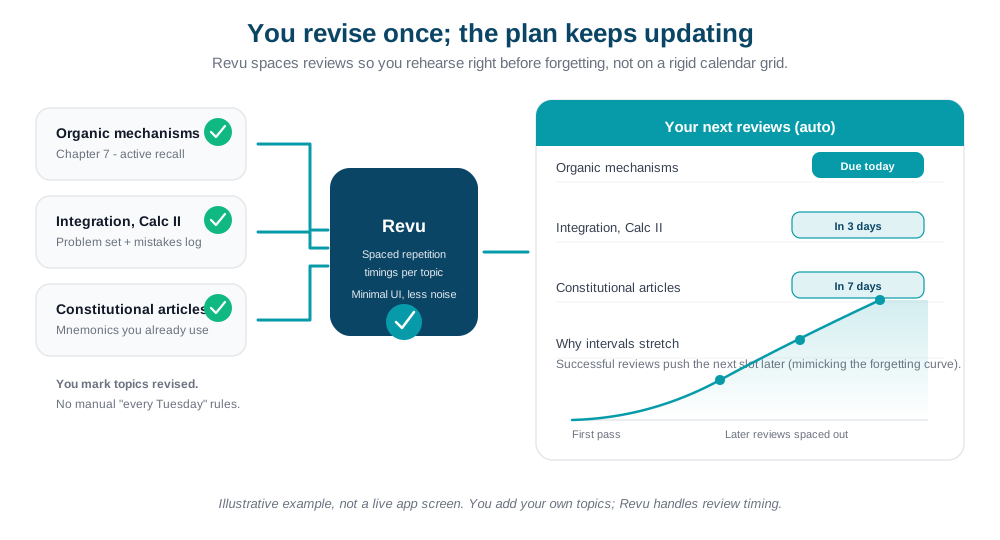
Revu is a standout for students who want a “set it and forget it” approach to memory. Instead of manual scheduling, you simply mark topics as revised, and the app’s internal logic triggers the next revision session based on your personal retention levels. It’s designed with a premium, minimal aesthetic that focuses on reducing the stress of a crowded calendar.
2. Best “Second Brain”: Notion
Notion remains the powerhouse for total academic organization. In 2026, it serves as a central hub where you can link your class notes directly to your assignment trackers. Its flexibility allows you to build a custom “Student Dashboard” that matches your specific workflow, whether you’re in high school or a PhD program.
3. Best for Long-Term Memory: Anki
Anki is the “gold standard” for students who need to memorize massive amounts of data, like medical or law students. It uses a pure Spaced Repetition System (SRS). While it has a steeper learning curve, its ability to handle thousands of flashcards with mathematical precision makes it irreplaceable for high-stakes testing.
4. Best for Aesthetic Focus: Forest
Forest addresses the biggest hurdle in studying: your phone. By growing a digital tree while you stay off your device, it gamifies focus. By 2026, it has expanded its “Plant Together” features, allowing study groups to grow a communal forest, providing social accountability for deep-work sessions.
5. Best for Visual Thinkers: Heptabase
Heptabase is a rising star in 2026 for those who find linear notes too restrictive. It’s a “spatial” research tool where you can map out complex topics on a visual whiteboard. It combines the structure of a database with the freedom of a mind map, making it ideal for planning complex essays or research projects.
6. Best for Minimalist Productivity: Things 3
If you are a fan of “Apple-style” design, Things 3 is the most refined task manager available. It uses intentional whitespace and a “Today” view that clears out everything except your immediate goals. It is perfect for students who feel overwhelmed by complex dashboards and just want a beautiful, simple place to track deadlines.
7. Best for Time Blocking: Akiflow
Akiflow is built for the student who lives in their calendar. It pulls in tasks from your email and other apps and lets you drag them directly into time slots on your schedule. This ensures you aren’t just “planning” to study, but actually allocating the physical hours needed to get the work done.
8. Best for Note-to-Card Flow: RemNote
RemNote bridges the gap between taking lecture notes and active recall. Every bullet point you type can be instantly converted into a flashcard. This “fluid” system means you spend less time building study materials and more time actually learning them.
9. Best for Adaptive Scheduling: Shovel
Shovel is a “Study Planner” in the truest sense. It calculates exactly how many hours you have available in a week after accounting for classes, meals, and sleep. It then tells you if your current study goals are actually realistic, preventing the burnout that comes from over-scheduling.
10. Best for Quick Capture: Todoist
Todoist is the ultimate “utility” app. Its natural language processing—allowing you to type “Physics lab report due Friday at 2pm”—makes it the fastest way to get assignments out of your head and into a trusted system. It’s reliable, fast, and works on every device imaginable.
Which tool fits your style?
| If you want… | Try… |
|---|---|
| Scientific Memory & Minimal UI | Revu |
| To see your whole life in one place | Notion |
| Strict discipline and focus | Forest |
| Powerful, custom flashcards | Anki |
| A visual map of your subjects | Heptabase |